Human-Centered AI Design Guidelines
Three tiers of AI presence, five principles, one position: AI assists. The user decides.
Overview
The company was about to ship a wave of AI features across modules: a chatbot, an SDS extraction flow, a 5 Whys root cause assistant, image translation, generated questions for trainings, and more. Every team was designing AI a little differently. Some used purple, some didn’t. Some asked for confirmation, some didn’t. Some labeled AI clearly, some didn’t.
I authored Human-Centered AI Design Guidelines: the design system other designers and engineers now use to design AI features. What it includes:
- ✔ A manifesto with five non-negotiable principles.
- ✔ A token-based visual identity (color, icon, gradient) that engineers can’t get wrong.
- ✔ A three-tier classification (Micro, Mid, Main) that decides behavior before anyone starts designing.
- ✔ Do-and-don’t rules for every tier and every visual element.
- ✔ Real applications in the platform: SDS Extract (Mid), 5 Whys Analysis (Mid), EHS Agent (Main), face blur and translation (Micro).
The problem
The interesting question wasn’t “what should AI look like.” That question makes you write a style guide. It produces a Figma file with a purple gradient and an icon nobody enforces.
The right question, the one I built the system around, was what kinds of AI presence exist in our product, and what behavior does each kind demand?
That question makes you write a system. Once you can name the kinds of AI presence, the layout, the labeling, the confirmation rules, the failure modes, and the visual weight all follow from the kind. The designer doesn’t have to invent. They classify. The classification does the rest.
The decisive call: three tiers
Every AI feature in the platform falls into one of three tiers. Each tier has its own layout pattern, its own visual rules, and its own behavior contract.
1. Micro AI: inline assistance
A small assistive action embedded inside an existing workflow. The AI affects a single field or object. The workflow stays human-led.
Examples in the platform: image face blur, on-demand translation, data record summarize, short text suggestions.
Visual rule: lightweight. Default button background, sparkle icon as the AI indicator, a subtle background tint on generated output. Never a full purple button. Never a gradient on the page.
Behavior rule: edit or discard immediately, never auto-save, never overwrite silently.
2. Mid-Level AI: suggestion containers
The AI generates structured, editable content inside a workflow. The user must review before applying. The AI proposes; the user confirms.
Examples in the platform: 5 Whys Analysis, Generate Questions for online instruction, Image Description.
Visual rule: a container. The AI gradient background is allowed inside the container, with a label at container level. The container is the boundary of the AI’s authority. Outside the container, the workflow is human.
Behavior rule: editable, deletable, regenerable, refinable. Never auto-save. Never overwrite without confirmation. Always require explicit review before final save.
3. Main AI: dedicated workflows
The AI is the task. The user enters a dedicated workspace where AI generation, conversation, or analysis is the primary activity.
Examples in the platform: EHS Agent chatbot, Reporting Assistant.
Visual rule: full-height right drawer or a dedicated page. Persistent AI identity in the header. Background stays neutral. Accent gradient is reserved for highlighting AI explanation blocks, never for tinting the whole workspace. Enterprise tone over visual excitement.
Behavior rule: outputs may be exported, never auto-overwrite records, never submit on behalf of the user. Human remains the final authority.
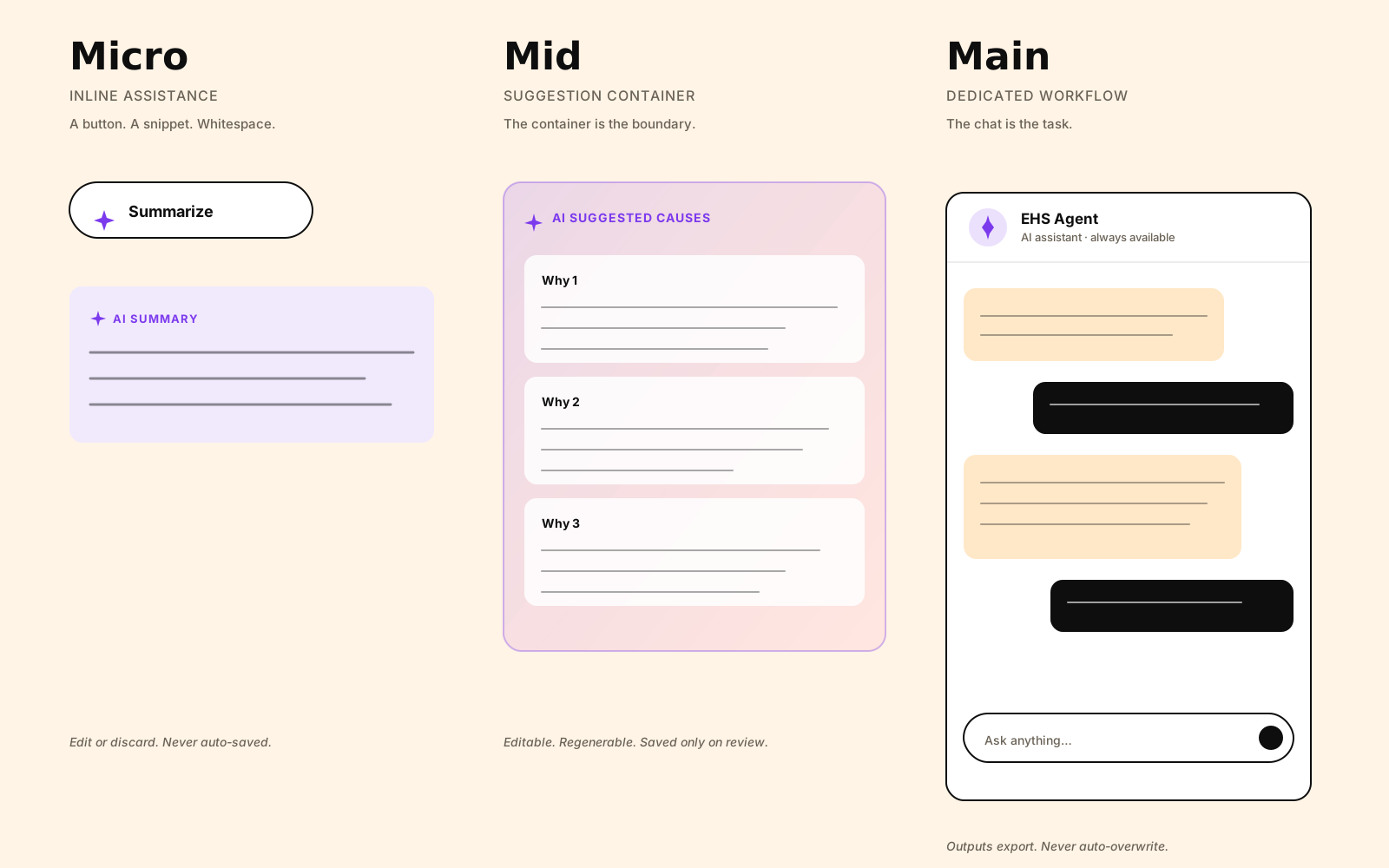
The taxonomy is the spine. Once a feature is classified, the rules apply themselves.
The principles
Five principles sit on top of the taxonomy. They’re the contract every AI feature signs, regardless of tier.
AI supports decisions. Users remain in control. AI explains itself. Nothing happens silently. AI must be predictable and reliable, not impressive.
Expanded:
- Assistive, not authoritative. AI suggests actions. Users approve outcomes. AI is never the final decision-maker for critical actions.
- Transparency over magic. Users must always understand what AI did, why it did it, and what changed. Hidden logic breaks trust.
- No silent changes. AI must never overwrite, delete, or unlink data without explicit user awareness and confirmation.
- Predictable behavior. AI behavior must follow consistent logic and interaction patterns across the product.
- Fallbacks are mandatory. Every AI feature must have a retry option and a manual alternative. AI failure must never block task completion.
The line that does the most work in the manifesto:
If AI cannot clearly improve the experience, it should not exist.
It’s a permission to refuse AI. Without that line, every product manager has the right to ask why a feature isn’t AI-powered yet. With it, the designer has the right to say “because it shouldn’t be.”
The visual identity
The system isn’t documentation. It’s wired into design tokens.
colors/AI/Accent is the AI accent color. Purple. Used for the sparkle icon, AI labels, and contextual indicators only. Never for success, warning, error, validation, or required-action states. AI color is informational. It doesn’t carry system meaning.
colors/AI/Background is the gradient. Allowed for AI suggestion containers, AI modals, AI-generated summaries. Never for confirmation dialogs, warnings, error states, or destructive actions.
The sparkle icon means AI is involved. It is never decoration. If you see it, AI did something. If AI did something, you should see it.
The system also has dual guidance for the reality of running parts of the platform on a legacy stack alongside the modern design system: text-only AI labels for the classic stack, chips for the modern stack. Same rule, two implementations, no excuses for skipping the label.
Language and tone
AI communication in the platform must be:
- Neutral and factual.
- Clear and concise.
- Free of emotional language.
- Free of human-like expressions or judgment.
No “Sure!” No “Great question!” The AI is a tool, not a colleague. In an enterprise EHS platform where users are managing chemicals, incidents, and audits, friendly AI reads as untrustworthy AI. The tone rule prevents the friendliness from leaking in.
Constraints
- Two stacks at once. Parts of the platform are still on legacy tech, parts on the new design system. The guidelines have to work in both. Every visual rule has classic-stack and modern-stack guidance, and the rules don’t relax for legacy.
- Regulated domain. Enterprise EHS. Compliance officers, safety managers, audit defenders. AI has to feel sober. The principles, the tone rule, and the “AI is informational, not validating” color rule all defend that.
- Token-first. The AI color and gradient exist as design tokens before they exist anywhere else. That makes them engineering-enforceable, not aspirational. A pull request that uses AI purple for a confirmation dialog can be flagged at review against the token rules.
How it shows up in shipped work
The clearest test of a system is whether the things built under it look like they belong together.
SDS Extract is a Mid-Level AI feature. The diff view is a container. The four-state vocabulary (added, changed, removed, unchanged) maps to the principle of no silent changes. The granular row-level checkboxes map to assistive, not authoritative. The match-confidence override pattern maps to transparency over magic. None of those design choices were invented for SDS Extract. They were applications of the system.
5 Whys Analysis is also Mid-Level. It generates structured causes inside a container. The user reviews, refines, regenerates, or deletes. Saving is explicit.
EHS Agent is Main. Full-height drawer, neutral background, persistent AI identity. The chat is the task.
When the next AI feature ships, the designer doesn’t argue about whether to use purple, or whether to require confirmation, or where to put the sparkle. They classify the feature into a tier. The rules apply themselves.
Closing
The most honest version of this case study: the design call wasn’t visual. It was conceptual.
Three tiers, five principles, one position. AI assists. The user decides. The visual system, the tokens, the do-and-don’t rules are all consequences of that position. They write themselves once the position is clear.
What I wanted from the system was for the next person designing an AI feature to spend zero time deciding what it should look like, and all of their time deciding whether it should exist.