SDS Extract
AI parses the safety data sheet. The human owns the update.
Overview
A daily reality for safety officers at large industrial companies: chemical suppliers ship updated safety data sheets every time a formula, classification, or regulation changes. Every one of those PDFs has to be reconciled against an existing chemical record in the platform. Doing it manually means flipping between a PDF and a form, hunting for what changed, and praying nothing was missed.
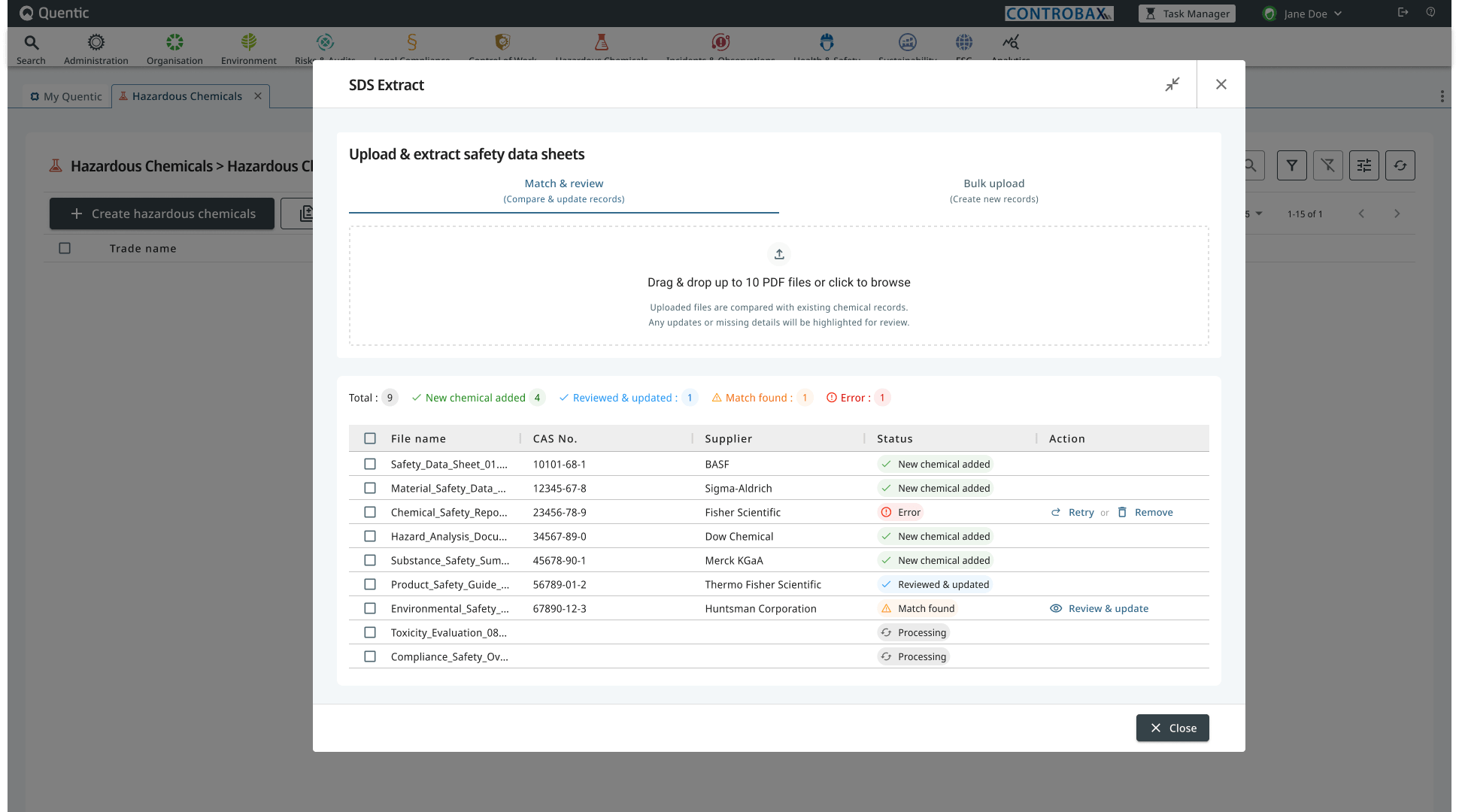
SDS Extract is an AI-assisted feature in the platform’s Hazardous Chemicals module. The AI does one job: parse the supplier’s PDF into structured fields. Everything after that is logic my team and I designed and built: how the parsed SDS is matched to an existing record, how the two are compared, what gets shown, what gets hidden, and how the user applies changes. This was the most complicated flow I’ve worked on.
What I owned, in collaboration with engineering and product:
- ✔ The end-to-end flow from upload to applied update, including all decision branches.
- ✔ The four-state diff vocabulary (added, changed, removed, unchanged) and how each renders.
- ✔ The noise-reduction strategy: matched fields aren’t shown at all, and every section is a collapsible accordion so reviewers can fold away what they’ve already cleared.
- ✔ The match-confidence pattern and the override path when the AI guesses wrong.
- ✔ Granular row-level controls so humans accept or reject each change individually, not just in bulk.
- ✔ The two paths out (Update existing or Create new) so the user keeps authority over the underlying decision.
- ✔ Empty-state vocabulary distinguishing “no prior data” from “not included in the SDS.” Two states that look alike but mean different things.
The problem
A chemical record in the platform is a long document: classifications, hazard pictograms, H-statements (hazard codes like H225 highly flammable), P-statements (precautionary codes), water hazard class, storage class, chemical substances and their concentrations, waste codes, labeling, and more. When a supplier ships an updated SDS, any field could have changed. Maybe nothing did. Maybe twenty things did. The compliance officer’s job is to find out, decide which changes apply, and apply them.
Before this feature, that meant opening the PDF on one screen and the existing record on another. There were good reasons it had stayed manual:
- The data is regulated. Mistakes have consequences.
- PDFs from different suppliers use wildly different layouts and languages.
- A “change” isn’t always a real change. Some are cosmetic, some are version-string updates, some are critical.
- The human, not the AI, is legally accountable.
Anything we built had to be faster than the manual flow without ever quietly overriding the user.
The approach
I started by mapping how the existing solutions in the EHS space handle this problem. They share a pattern: a two-pane layout with the PDF on one side and a structured form on the other, often with sync-on-click or sync-on-scroll between them. The user flips back and forth and edits the form by hand.
The pattern works, but it preserves the manual-cross-reference burden. The AI is only doing OCR. The human is still doing the diff in their head.
The decisive call I made early: don’t build a PDF viewer. Build a diff view.
The AI parses the SDS into a structured object. The existing record is already a structured object. From there, the matching, comparison, and rendering logic is ours: which fields map to which, when two values count as “the same” vs. “changed,” what to surface and what to suppress. The user doesn’t need to look at the PDF unless they want to verify a specific field. The PDF stays accessible as a source-of-truth fallback, but it isn’t the dominant surface.
That single decision unlocked the rest of the design, but the work behind it was substantial. Mapping every field type a supplier might send into a deterministic comparison the user could trust was the most complex set of design rules I’ve authored.
Designing the diff view
1. A four-state vocabulary
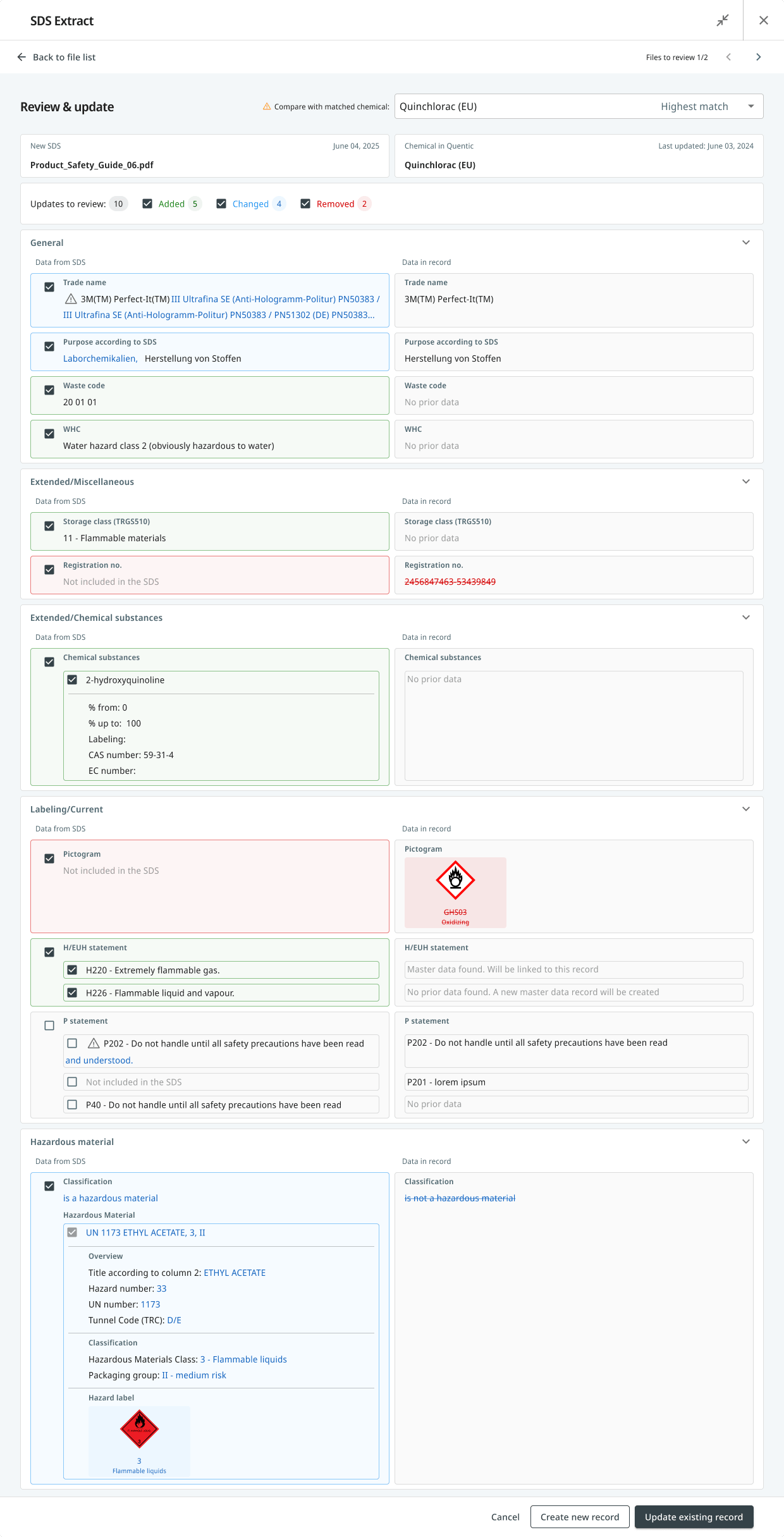
Every field in the diff falls into one of four states. Each one looks visually distinct, so a user scanning the screen at speed never has to read carefully to know what kind of change they’re looking at:
- Added. The existing record has no value, the SDS provides one. Shown with a blue background on the SDS side. The record side reads “No prior data.”
- Changed. Both sides have values, and they differ. Both values are shown side by side with the differences highlighted.
- Removed. The existing record has a value, but the new SDS doesn’t include it. Shown with red strikethrough on the record side and “Not included in the SDS” on the SDS side.
- Unchanged. Both sides match. Not rendered at all. A typical SDS has dozens of fields and most won’t have changed; surfacing them would drown the actual deltas in noise. The filter chips at the top still count and label them, but they don’t take up vertical space.
Record was blank. SDS offers something new.
Both sides have a value, and they differ.
Record value not preserved in the new SDS.
Both match. Not rendered — kept out of the noise.
On top of that, every section in the diff view is a collapsible accordion. Reviewers can fold away parts they’ve already cleared and focus on the sections still pending. This matters on long records where even the rendered deltas can run for many screens.
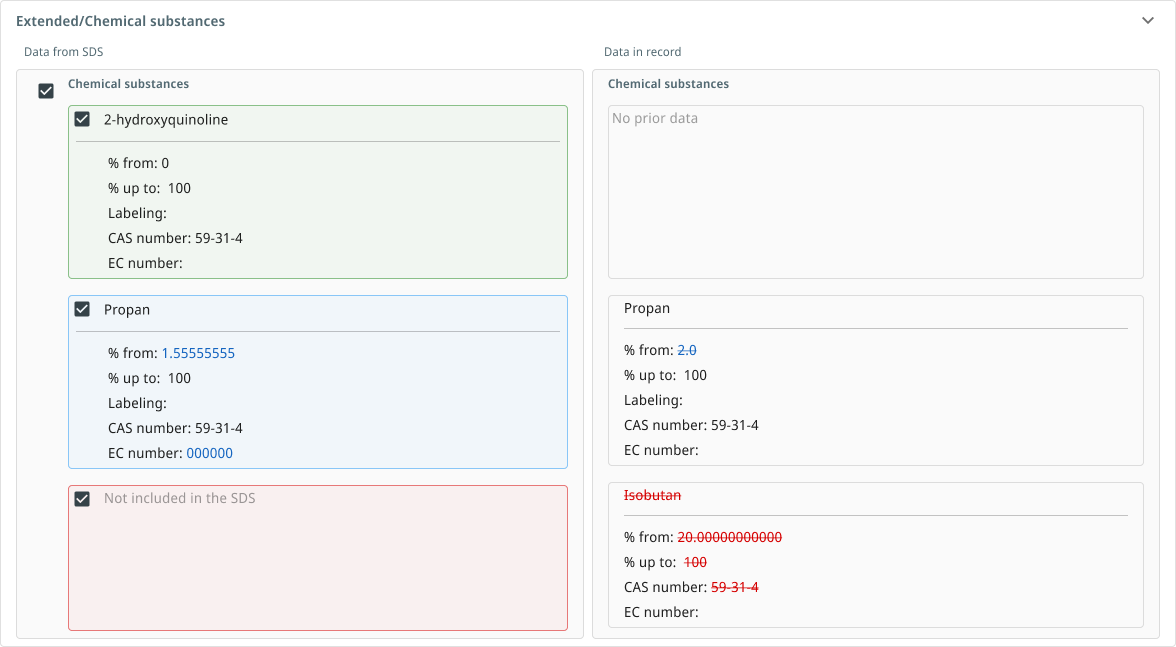
The hardest part of this vocabulary was distinguishing no prior data from not included in the SDS. They look similar but mean different things. One says the record was always blank; the other says the record had a value the new SDS doesn’t preserve. Conflating them would let real removals slip past as missing data.
This field never had a value in the chemical record. The SDS is offering something new.
→ Treated as an addition.
The record had a value, but the new SDS doesn't mention this field. A real removal — not a blank.
→ Treated as a removal. Requires a decision.
2. Match confidence with an override
When a new SDS arrives, it has to be matched to an existing chemical record before a diff makes sense. The AI proposes the most likely match and labels it explicitly: Highest match. A dropdown lets the user pick a different match if the AI guessed wrong, with a tooltip nudging this choice when more than one chemical is plausible.
The thing this avoided: silently locking the user into the AI’s first guess. The AI is allowed to be confident. It isn’t allowed to be hidden.
3. Granular control, not bulk accept
Every row in every section has its own checkbox. The user picks which changes to apply. A bulk-accept button would have been faster, but the wrong design for a regulated domain. A user who has to defend an audit needs to be able to say I made this decision for every individual field that changed.
Top-level filter chips (Added 5, Changed 4, Removed 2) let users review by category when there are many changes, but the unit of action is always one field, not one bulk update.
4. Two paths out
The most decisive call in the flow: at the end of the review, the user can update the existing record or create a brand new one.
The diff applies to the matched chemical. Accepted changes are written to the existing record.
When: the match is correctThe match is wrong at a deeper level. SDS data is preserved and a fresh chemical record is created instead.
When: the SDS is a different productThe reason both paths matter: sometimes a “match” is wrong in a deeper way than the AI can recognize. Two suppliers can issue SDSs for chemicals that look similar in name and classification but are genuinely different products. If the user realizes mid-review that the diff shouldn’t be applied to the existing record at all, they need an exit that doesn’t waste their work. Create new record preserves all the SDS data they’ve reviewed and creates a fresh entry, instead of forcing them to cancel and start over.
5. Validation that explains itself
The pattern: never let the user submit an invalid update, but always tell them why. Each gate has a tooltip explaining the rule. For example: At least one hazardous material must be selected to apply this classification update. The validation isn’t there to block the user. It’s there to teach them what the platform considers a valid update, in the moment they need to know.
Constraints
- The data is multilingual. SDSs in the EU come in German, English, French, and many more, often with layout differences between suppliers. The AI’s extraction had to be robust to this; the design had to assume the AI would sometimes be wrong.
- The audience knows the regulation better than I do. EHS compliance officers are domain experts. The design had to be readable to them at speed without watering down the regulatory language. Codes like H225, P202, GHS03 are not jargon to remove. They’re the user’s vocabulary.
- The design system was mid-migration between MUI 5 in the host module and MUI 7 in the new design system. New components had to live in the legacy module without looking out of place.
- The existing record format couldn’t change. The diff view had to map cleanly to the same fields the manual editor used, so users could fall back to manual editing without translation.
What ships in June
The Review and Update screen, the four-state diff, the match-confidence pattern, the granular row controls, the dual paths, and the validation gates are shipping to customers in the Hazardous Chemicals module in June 2026. Internal testing showed the feature is significantly faster than the manual workflow — time-to-complete numbers will be published here once measured against live usage.
Every design decision in this case study carries a question I’ll be testing once the feature is in customers’ hands:
- Does the four-state vocabulary hold up at speed? Compliance officers review long records under time pressure. If users slow down to parse the diff states rather than scanning them, the visual grammar needs work.
- How often is the AI’s match overridden? A high override rate means the confidence pattern isn’t surfacing the right signal, or the matching logic needs improvement.
- Which path do users take at the end — update or create new? A high rate of “Create new” may indicate the matching confidence threshold is too low, not that users want a new record.
- Does granular row control get used, or do users accept everything? If acceptance is near-universal, a reviewed bulk-accept may be worth revisiting. If selective acceptance is common, the row-level controls are doing real work.
This section will be updated with outcomes once early signal lands.
If I were to write the most honest version of this case study, the most important thing isn’t any single screen. It’s the underlying design call: a diff view, not a PDF viewer. AI has the authority to parse and compare. The human has the authority to decide. The interface keeps that boundary visible at every step.